Congress Realty is a flat fee MLS brokerage serving Phoenix homeowners through Multiple Listing Services. How to read a settlement statement comes down to tracing each charge and credit to the amount you bring to closing or receive from a sale. In Phoenix, understanding the paperwork helps you see how the numbers add up, not just what the final line says.
A settlement statement summarizes the buyer’s and seller’s charges and credits. It can show loan costs, taxes, title charges, earnest money, and seller proceeds. The document format depends on the transaction. This guide explains how to compare final charges with the Good Faith Estimate and spot figures that need clarification before signing. You’ll leave with a clearer view of Phoenix closing costs and the money moving at the finish line.
Key Takeaways
- Trace charges and credits to understand how the statement reaches the buyer’s cash-to-close amount or the seller’s proceeds.
- Separate loan origination charges from third-party services so each cost is easier to review.
- Look at earnest money, seller concessions, and prorations to see how earlier payments and shared expenses affect the closing totals.
- Compare final charges with the Good Faith Estimate and pay attention to the categories that have limits on how much they can change.
- Understand how Multiple Listing Services can support a home sale while keeping your closing figures in view.
How Do You Read a Settlement Statement?
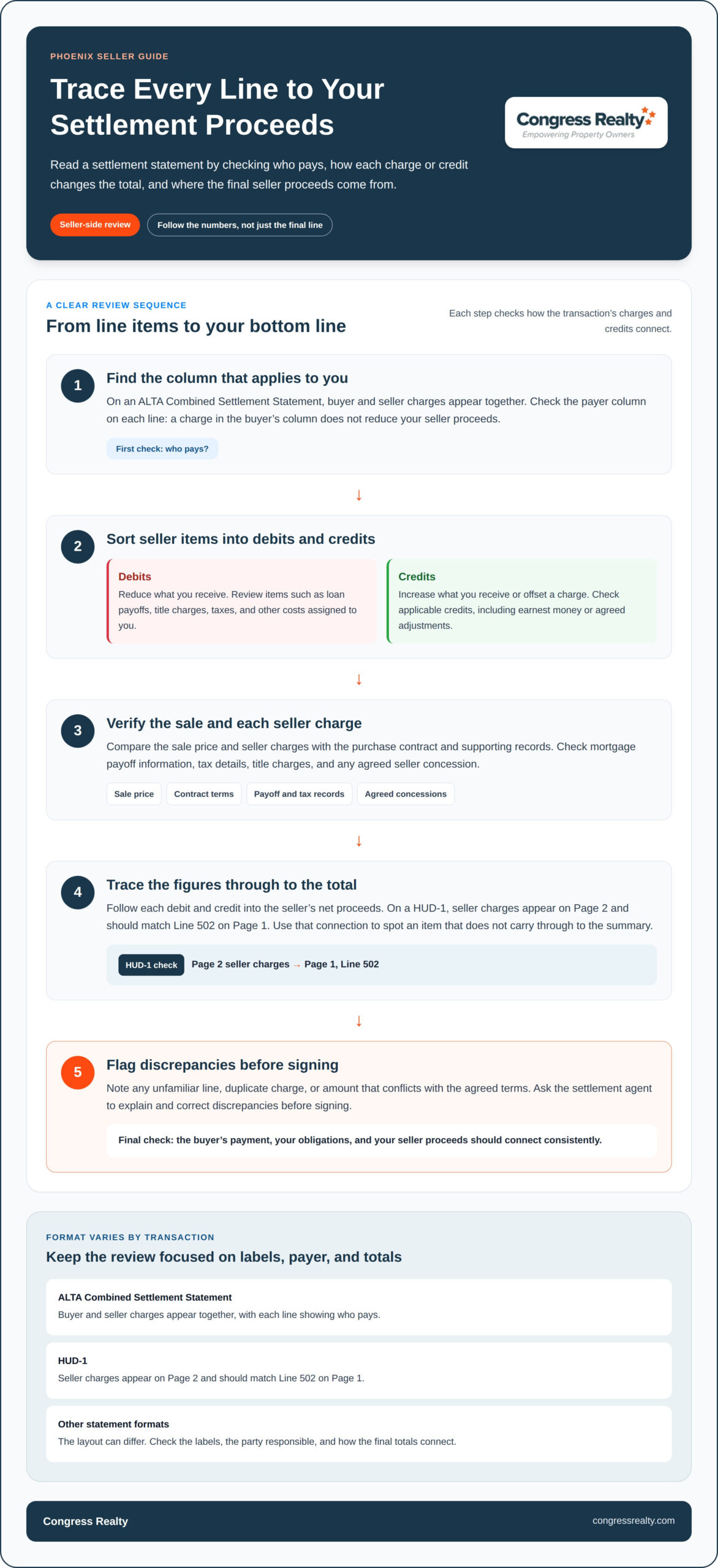
To understand how to read a settlement statement as a seller, trace the figures from individual charges and credits to the final proceeds. First, identify which column applies to you. On an ALTA Combined Settlement Statement, buyer and seller charges appear together, with each line showing who pays. A charge in the buyer’s column does not reduce your proceeds.
Next, sort seller items into debits and credits. Debits reduce what you receive; credits increase it or offset a charge. Compare each line with the purchase contract and supporting records, such as mortgage payoff information, tax details, and any agreed seller concession. The statement should consistently show what the buyer pays, what you owe, and what remains for you.
- Check sale proceeds: Confirm the sale price and make sure the amount reflects the agreed transaction.
- Review seller charges: Look for items such as loan payoffs, title charges, taxes, and other costs the contract assigns to you.
- Review credits: Confirm that applicable credits, including earnest money or agreed adjustments, appear in the right place.
- Trace the total: Follow the debits and credits through to the seller’s net proceeds, rather than relying on a single total.
On a HUD-1, seller charges appear on Page 2 and should match Line 502 on Page 1. Use that connection to catch a charge that appears in one place but does not carry through to the summary. A settlement statement can also use another format, so focus on the labels, the party responsible, and how the final totals connect.
Note any unfamiliar line, duplicate charge, or amount that conflicts with the agreed terms. Ask the settlement agent to explain and correct discrepancies before signing. Reviewing each closing cost helps you understand its effect on your bottom line and gives you a clear basis for specific questions.
Origination charges and third-party services
A settlement statement itemizes charges and credits, while the document name and layout depend on the transaction. The Closing Disclosure is the standard mortgage settlement statement; its second page roughly compares with a HUD-1, which remains relevant for cash transactions and some commercial deals.
In the United States, the form depends on the transaction: mortgage borrowers generally receive a Closing Disclosure, while reverse mortgage borrowers use a HUD-1. The contract and transaction details determine who pays particular charges, so review those terms alongside the statement.
Origination and Loan Charges
Origination and loan charges cover costs lenders incur when they arrange, evaluate, and close a mortgage. Lender-related items can appear alongside services from outside companies, so check what each charge covers before treating them as the same type of cost.
Look for labels such as underwriting, appraisal, inspection, title administration, closing, and loan insurance. Compare each charge with the loan paperwork and the provider’s description of the service. For prepaid taxes, insurance, or escrow deposits, determine whether the line records an advance payment or funds the borrower deposits for a future bill. That distinction clarifies what the borrower pays now.
Title Company and Settlement Charges
Title and settlement charges cover services related to reviewing title and completing the closing. The purchase contract may assign a charge to either party, even when the service relates to the transaction as a whole.
Separate lender’s title insurance from owner’s title insurance. A lender requires lender’s title insurance when the buyer takes a mortgage; the owner’s policy protects the buyer against title issues, subject to policy exceptions. The seller typically pays for the owner’s policy, but the contract may assign it to either party. Check that the statement’s payer column matches the agreement.
Charges Paid Outside Closing
The statement lists charges that the borrower paid outside closing as paid outside of closing, often with the notation “POC.” On a HUD-1, Section 800 identifies these charges. Check that the notation distinguishes an amount the borrower already paid from money due at the table.
If the lender marks an appraisal charge POC, don’t count it again as an unpaid closing charge. Compare its amount and description with the lender’s records, then look for any remaining balance listed separately. This prevents double-counting and keeps the closing total clear.
Borrower Charges and Credits
Borrower charges increase the amount owed, while borrower credits reduce it. On a HUD-1, Line 120 shows the total amount the borrower owes; Line 201 shows money the borrower already paid, and Line 202 reflects the new loan’s principal.
Line 220 totals borrower credits in Section 200. Trace each credit to its source, such as funds the borrower already paid or an adjustment the parties agreed on. Then compare the individual entries with the summary. A missing credit or a charge entered twice can change the amount due, even when the underlying loan terms remain the same.
Estimated and final cash to close
Cash to close is the amount the buyer must provide after the lender, title company, and buyer account for charges, credits, and loan funds. Distinguish the early estimate from the final figure before planning payment. Knowing how to read a settlement statement starts with understanding that these figures serve different purposes.
Estimated Cash to Close
Estimated cash to close is a preliminary calculation of the buyer’s funds needed for closing. It helps the buyer prepare, but it is not the final payment amount or instruction.
A review copy of the settlement statement shows estimated cash to close. On a HUD-1, Line 303 shows how much the borrower needs to bring. Compare the estimate with the mortgage documents and listed figures, including the down payment, loan amount, charges, credits, and prepaid items. For example, a credit already entered should reduce the amount due, not appear as an extra charge.
The estimate can change as the lender and settlement agent update closing figures. A revised payoff, updated tax proration, or corrected charge can shift the balance. Compare the earlier draft with the latest version and identify which line changed. This helps pinpoint the amount or calculation that needs an explanation.
Final Cash to Close
Final cash to close is the amount the lender determines the borrower must provide at closing. Unlike the earlier estimate, this figure guides the payment.
The lender finalizes the amount due and provides payment instructions. Review the final Closing Disclosure alongside the mortgage documents, then compare its cash-to-close total with the latest settlement statement. This helps you check whether the documents use consistent figures.
At this stage, focus on what changed. A revised loan amount affects how much financing covers the purchase; a changed charge or credit affects the balance differently. Confirm each adjustment appears in the correct place and flows through to the total. If the numbers don’t reconcile, ask the lender or settlement agent to explain the specific line before sending funds.
Follow the lender’s or title company’s final instructions for the payment method and destination. Don’t rely on earlier draft figures or separate payment details. This helps keep the amount you prepare aligned with the final closing documents.
Reviewing credits, earnest money, and prorations
Credits reduce the amount a party owes, while prorations divide shared expenses according to the closing date. Compare each entry with the purchase contract and disclosure to confirm the timing and responsible party.
Credits on the Statement
A credit gives a party an amount in its favor, and it matters because it changes funds due or the seller’s proceeds. For example, the seller pays a concession as a debit, and the buyer receives it as a credit. The new lender may limit the concession, so compare the entry with the agreement and loan terms.
Check who receives each credit and what it offsets. A buyer credit should not appear as money the buyer owes, and a reduction in seller proceeds should have a matching reason. Trace every entry to its source, then confirm it flows into the final total.
Earnest Money
Earnest money is the buyer’s earlier payment toward the purchase. Its credit reduces the funds still due at closing. Find the deposit entry and confirm it appears on the buyer’s side, not among the seller’s expenses.
Compare the amount with the purchase records and closing statement. A missing deposit, duplicate entry, or wrong-party assignment changes the cash calculation. Keep the deposit distinct from a seller concession: the buyer makes the earnest money payment earlier, while the seller agrees to cover a cost through a concession.
Prorations and Escrow
A proration divides a recurring expense between buyer and seller based on the closing date. For property taxes, the statement charges the seller for the current-year portion from January 1 through closing. Review the dates and payer columns to see whether the allocation follows each party’s ownership period.
HOA dues require a similar timing check: the seller covers dues through closing, and the statement credits the seller for dues the seller paid in advance. Escrow deposits for taxes or insurance are different because they hold funds for future bills. Identify whether a line allocates an existing expense or sets money aside.
For each adjustment, compare the statement’s dates, amount, and payer with the contract and supporting records. This reconciliation can reveal a misplaced credit or incorrect period before the closing figures become final.
Cash to close and seller net proceeds
Buyer closing costs can include mortgage charges, title services, prepaid taxes, insurance, and escrow deposits. Seller fees may include a mortgage payoff, agreed title charges, taxes, and contract-related costs. The purchase agreement determines who pays each item, so compare its terms with the statement.
Seller Fees
Seller fees are charges the purchase agreement assigns to the seller, and each debit reduces sale proceeds. Review the contract’s payment terms beside each seller-side line. For example, a title charge belongs in the seller’s column only if the agreement assigns it to the seller.
A mortgage payoff can include interest for a few days beyond closing. Compare the payoff line with the lender’s current figure and check that it reflects the expected closing date. Also review property tax prorations, HOA dues, and any seller concession. Each charge should have a clear basis in the agreement or payoff information.
Seller Net Proceeds
Seller net proceeds are what remains after the settlement agent deducts seller charges from the sale price and applies applicable credits. This figure estimates what the seller receives at closing, rather than the home’s gross sale amount.
Trace the total from the sale price through each debit and credit. Confirm that the mortgage payoff, taxes, title charges, and agreed concessions appear once and on the seller’s side. Compare the resulting proceeds with your expectations and the contract terms. A changed payoff or proration can alter the final amount.
For the buyer, cash to close reflects the funds still due after the lender provides the mortgage amount and the settlement agent accounts for prior payments, charges, and credits. On a HUD-1, Line 303 shows the borrower’s required funds. The final figure depends on the transaction’s actual charges and credits, not a standard amount for every home purchase.
Use this review to connect each total to its source:
- Buyer: Compare mortgage funds and credits with the cash-to-close total.
- Seller: Compare the sale price, assigned charges, credits, and payoff with net proceeds.
- Both parties: Match title charges and prorations to the purchase agreement.
If a total differs from the earlier estimate, identify the changed line and ask the settlement agent to explain its effect. Confirm any correction appears in the updated statement before relying on the final amount.
Comparing final costs with the Good Faith Estimate
Compare the final closing costs with the earlier Good Faith Estimate by matching charge categories and line items. The HUD-1 has three pages covering charges, who pays them, and a comparison with the estimate. This layout helps you track whether a final amount changed, who bears it, and where it appears in the transaction summary.
According to the Consumer Financial Protection Bureau, the HUD-1 Good Faith Estimate comparison groups settlement charges into categories that include charges that cannot change by more than 10%. Use those categories to focus your review. Compare each estimate with its final charge, then note whether the difference falls into a category with that limit.
Check the charge description before comparing amounts. Similar labels may refer to different services, and a service may appear under a revised description. Match the purpose and payer, not just the wording. For example, compare an estimated title service with the final charge that the settlement agent assigns to the same party.
- Match categories: Compare each estimate with its corresponding final charge.
- Check responsibility: Confirm the buyer or seller column matches the agreement.
- Trace totals: Follow the final charges to the transaction summary.
- Mark changes: Record the line, estimate, final amount, and category.
On a HUD-1, Page 2 settlement charges should match Line 103 for borrowers and Line 502 for sellers on Page 1. Compare those totals after reviewing individual items. If a page total differs from its summary line, identify the unmatched charge or calculation instead of treating the entire closing-cost total as one unexplained change.
Keep the Good Faith Estimate beside the final HUD-1 as you review. A changed amount deserves a clear explanation tied to its category, service, and assigned payer. This comparison makes it easier to distinguish a permitted adjustment from a mismatch that needs correction before closing.
Congress Realty
Congress Realty can be a practical next step for Phoenix homeowners who want listing support while keeping transaction costs clear. Multiple Listing Services help place a home in the listing marketplace, while the settlement statement records the charges and credits that the buyer and seller agree on at closing. These serve different purposes: listing tools support marketing, and closing documents show how money moves between buyer and seller.
When preparing a property for sale, Congress Realty’s listing services include a Virtual Tour, Yard Signs, and eLockbox or Key Lockbox options. A virtual tour can present the home remotely, signs can identify it to people nearby, and a lockbox supports property access. These tools relate to marketing and access, not to assigning closing charges.
Keep sale paperwork organized as the transaction progresses. Compare the purchase agreement with later closing figures to understand which costs come from the transaction terms. If a charge changes, follow its description, responsible party, and effect on your proceeds. Listing exposure, property access, and closing calculations are distinct parts of a sale, so review each separately.
For a Phoenix seller, the useful question is what support you need to bring the home to market. Multiple Listing Services address listing distribution. A Virtual Tour and Yard Signs provide additional ways to present the property. Lockbox options address access. These tools can support your sale while you remain focused on the contract, credits, charges, and final proceeds shown in the closing paperwork.
Congress Realty gives sellers practical listing options without taking away their role in understanding the transaction. Choose the support that fits your sale, then use the settlement statement to follow the financial details through closing. You stay informed about both the marketing process and the money the settlement statement records in the final documents.
Contact Congress Realty to discuss support for your home sale.
Frequently Asked Questions
What’s included in a HUD-1 form?
A HUD-1 shows transaction charges, credits, who pays each item, and totals for the buyer and seller. Its three pages cover charges, payer responsibility, and a comparison with the Good Faith Estimate. You may see loan costs, title services, taxes, payoffs, and amounts paid outside closing. The form’s details depend on the transaction, so use the line descriptions and party columns to understand each entry.
Where can I find my HUD-1 settlement statement?
Start with the title or settlement company handling the closing, which prepares the transaction paperwork. If your mortgage or reverse mortgage involves a lender, ask that lender where it keeps your closing documents. For a completed sale, look through your closing packet or electronic records for a file labeled HUD-1 or settlement statement. Keep the signed copy with the purchase, payoff, and tax records for later reference.
What is a settlement statement and what is it used for?
A settlement statement records the financial details of a real estate transaction, including the charges, credits, and amounts that each party pays or receives. It helps buyers see what they owe and sellers understand deductions from the sale proceeds. The document also creates a record of how the closing figures were calculated. For most residential mortgage transactions, borrowers use a Closing Disclosure rather than a HUD-1.
How do I read a real estate Closing Disclosure or settlement statement line by line?
Start with the document title and identify whether each line applies to the buyer or seller. Read the description, amount, and payment status together, then trace subtotals into the final summary. On a Closing Disclosure, page two lists transaction costs; compare those entries with the cash-to-close summary. On a combined ALTA statement, use the payer column to distinguish buyer charges from seller deductions.
What do the sections and codes on a HUD-1 settlement statement mean?
HUD-1 section numbers group similar transaction items. Section 800 identifies charges paid outside closing, often marked “POC,” so you can distinguish an already-paid item from an amount you still owe. Section 200 records borrower credits, with Line 220 showing their total. Check the label beside each code, since the section places a charge while the line description explains the specific service or adjustment.
How do I verify prorated property taxes, HOA dues, and utilities on a settlement statement?
Compare each proration’s dates and payer with the relevant billing period. For property taxes, check the tax period and the closing date the parties used in the calculation. HOA entries should reflect the dues period and any prepaid amount the buyer credits to the seller. For utilities, compare the service dates or final meter reading with the billing record. Flag gaps or overlapping periods for correction before signing.
What settlement statement errors should buyers and sellers look for before signing?
Look for duplicate charges, missing credits, incorrect payer columns, and totals that do not match their itemized lines. A POC charge should not appear again as unpaid. Compare the sale price, loan payoff, tax period, and agreed concessions with the transaction records. Check names and property details, too. Even a small labeling or arithmetic error can change the amount you owe or the seller’s proceeds.
How can I dispute an incorrect charge on a settlement statement before closing?
Send the settlement agent a concise written note identifying the document, page, line, disputed amount, and reason. Attach the relevant purchase agreement, invoice, payoff statement, or payment record. Ask the agent to review the calculation or charge assignment and provide a corrected statement if needed. Before signing or following payment instructions, compare the revised line and final totals with the prior version.