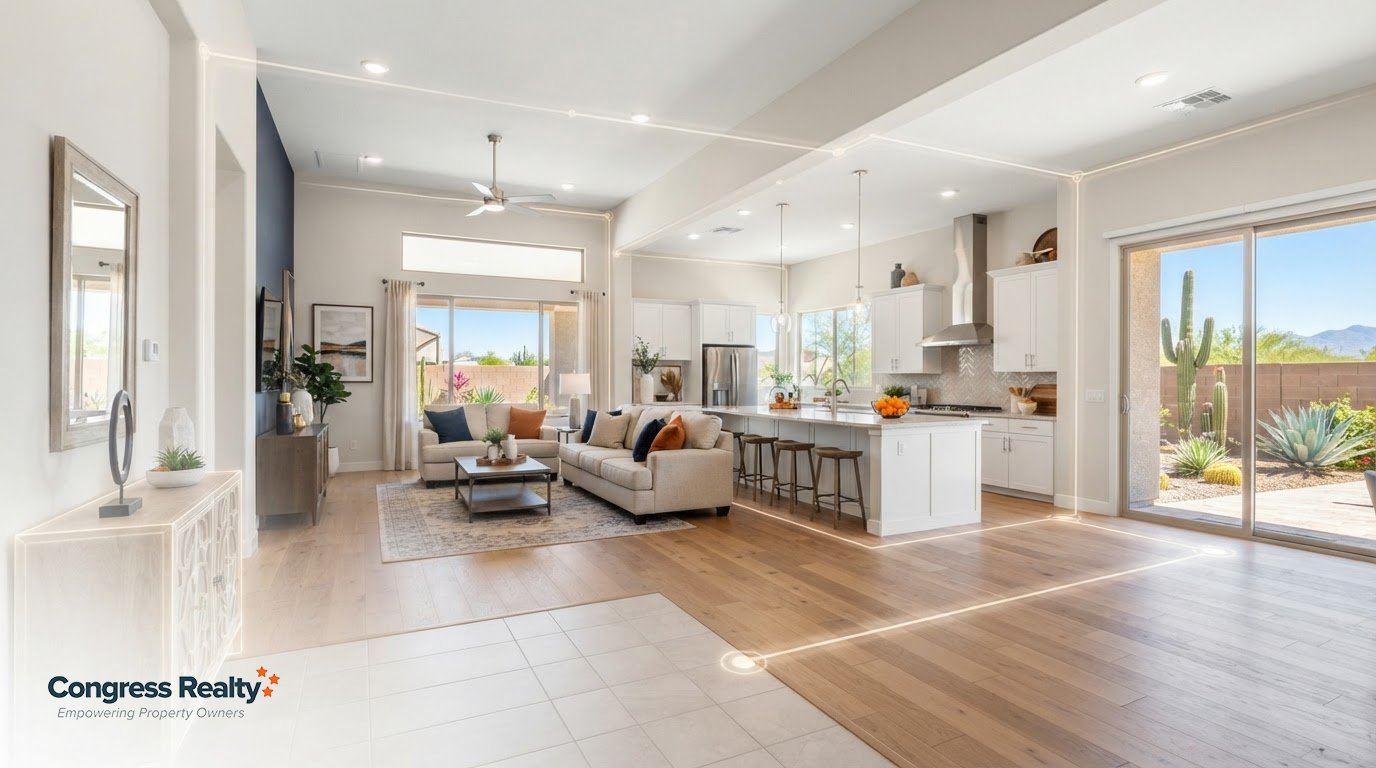
Congress Realty provides Multiple Listing Services and virtual tour options for home sellers in Phoenix. An interactive virtual tour for a real estate listing can help buyers explore how rooms connect before scheduling a visit. Viewers can move through the property online and examine the layout at their own pace.
Clear visuals make it easier for buyers to understand what a listing offers, especially when they’re considering a home from a distance. For Phoenix sellers, the key is to prepare each room, capture the spaces in a logical order, and make the tour easy to access. This guide explains how 3D tours present a home’s layout, support virtual open houses, and help prepare a listing for virtual showings in Phoenix.
Key Takeaways
- Show how rooms connect, not just what each room looks like, so buyers can better understand the home’s flow.
- Plan the capture route to make it easy for viewers to move through the property and picture themselves in it.
- Use a virtual open house to let buyers explore the listing on their own schedule.
- Prepare each room before filming so the tour presents the property clearly and consistently.
- Understand which choices affect tour costs, including the production approach and level of expertise involved.
Interactive 3D virtual tours for real estate listings
An interactive 3D tour lets buyers move between rooms and understand how spaces connect. For privacy, remove personal details before filming; use clear navigation and property-focused presentation to support accessibility and fair housing.
Sharing Tours Across Listing Channels
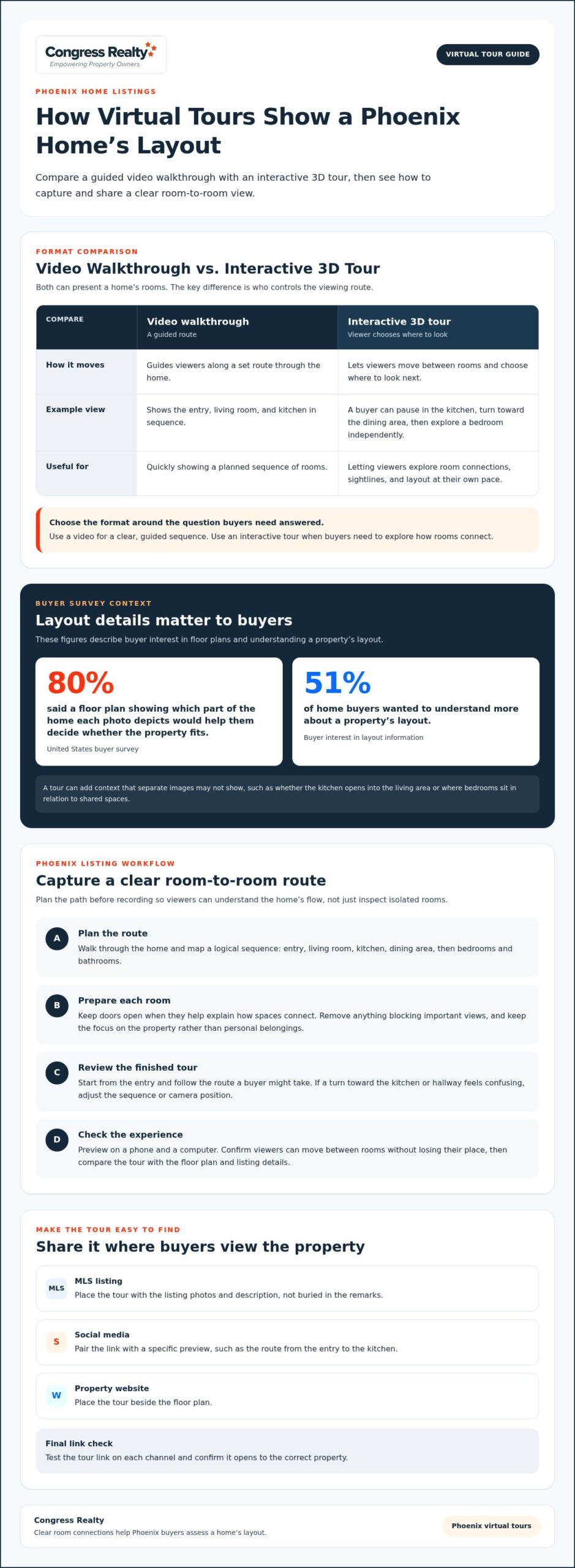
Place the tour where buyers already view the property: on the MLS listing, in a social media post, and on the property website. Make sure the tour link appears with the photos and description, not buried in the remarks. On social media, pair the link with a specific preview, such as the route from the entry to the kitchen. On a website, place it beside the floor plan.
Interactive Tours and Video Walkthroughs
A video walkthrough guides viewers along a set route, while an interactive tour lets them choose where to look next. A video can quickly show the entry, living room, and kitchen in sequence. A 3D tour can let a buyer pause in the kitchen, turn toward the dining area, then explore a bedroom independently. Use the format that best answers buyers’ questions about room connections and sightlines.
Benefits of Three-Dimensional Tours
A dynamic floor plan can help buyers match photos to rooms. In a United States buyer survey, 80% said a floor plan showing which part of a home each photo depicts would help them decide whether the property fits. A tour can also help a buyer rule out a home that doesn’t suit their needs before scheduling an in-person visit. It adds context that separate images may not show.
For example, buyers can follow the route from a bedroom to a bathroom or see whether the dining area opens onto the living room. This helps them assess everyday flow, not just finishes. Remote viewers can also examine the layout before planning a trip or a showing.
Virtual Tours in Less-Sought-After Neighborhoods
A tour can introduce a listing to buyers who haven’t considered its neighborhood. Show the home’s layout clearly and pair the tour with accurate property and location details. Don’t imply that a virtual tour changes a buyer’s view of the area. Instead, let viewers assess the home and decide whether its rooms, features, and setting suit their priorities.
Before sharing, test the tour link on each channel and confirm that it opens to the correct property. A buyer arriving from a social post should reach the home shown in the MLS, not a generic landing page. This final check keeps the experience clear, from the first click to room-by-room exploration.
Capturing rooms to show a home’s layout
Start with the route a visitor would naturally take, from the entry through the main living areas. Choose software and cameras that capture connected spaces clearly and make navigation easy for buyers.
Creating a Virtual Home Tour
Before capturing, walk through the home and plan a route that connects each room logically. For example, show the entry, living room, kitchen, dining area, then bedrooms and bathrooms. Keep doors open when they help explain how spaces connect, and remove anything blocking important views. Capture transitions between rooms so viewers can understand the home’s flow, not just inspect isolated spaces.
Review the finished tour from the entry point and follow the route a buyer might take. If a turn toward the kitchen or hallway feels confusing, adjust the sequence or camera position. Include each room that helps explain the floor plan, while keeping the focus on the property rather than personal belongings.
Layout deserves close attention: 51% of home buyers wanted to understand more about a property’s layout. A clear tour can show whether a kitchen opens into the living area, or whether bedrooms sit near the main gathering space. Those relationships help buyers assess everyday use in ways individual room views may not.
Researchers analyzed 75,178 home sales in the greater Los Angeles area from March 2019 to March 2021. They examined sale prices, days on the market, and initial prices. Use this as context for what researchers measured, not as proof that a tour alone changes a home’s sale outcome. Sellers should focus first on capturing an accurate view of the property.
Tour Software and Camera Selection
There’s no single best camera or software choice. Match the equipment to the result you need: a coherent room-to-room view, clear images, and simple navigation. Before capturing the full home, test one room and check whether doorways, corners, and adjoining spaces are easy to interpret.
Preview the tour on a phone and a computer. Confirm that viewers can move between rooms without losing their place and that the starting point makes sense. A practical setup presents the home consistently from the entry through its main rooms, without distracting jumps.
For a final quality check, compare the tour with the floor plan and listing details. If the kitchen appears beside the dining area in the tour, make sure the sequence shows that relationship clearly. An accurate presentation helps buyers understand what they’re viewing before deciding whether to schedule a visit.
As you prepare the listing, consider how a home-selling plan can bring the tour and property details together.
24/7 Virtual open houses
An online tour lets buyers explore a home at any hour, including outside scheduled showing times. Treat it as a self-guided open house: the listing presents the property, while each viewer chooses when to enter, where to look, and how long to stay. Sellers can use this format to offer flexible access without hosting a live event.
Make the tour easy to find in the listing. Place it near the property photos and include a direct invitation, such as “Explore the living room, kitchen, and bedrooms in the virtual tour.” Buyers browsing late in the evening should be able to move from the listing to the tour without searching through unrelated pages.
Prepare the experience as carefully as an in-person showing. Before publishing, open the tour on a phone and a computer, follow its navigation, and confirm that each room loads in the right order. Check that the opening view gives a clear starting point, such as the front entry, and that the last view doesn’t leave visitors facing a wall or an incomplete scene.
Keep the supporting listing details consistent with what the tour shows. If the description calls a space a bedroom, make sure the tour and other property information present it accurately. If a room serves as an office, describe it that way rather than leaving viewers to infer its use. Accurate details help buyers decide whether to schedule a showing.
A virtual open house can also be a useful first step before an in-person visit. Buyers can explore the property on their own, note questions about a feature, then request a showing to examine it in person. For example, someone curious about the connection between the kitchen and dining area can review the tour first and arrive with a focused question.
Don’t present an on-demand tour as a live host or real-time conversation. It shows the home on the viewer’s schedule, but doesn’t answer questions as they arise. Use clear listing details to cover basic information, and make the next step for arranging an in-person visit easy to understand.
Finally, test the entire path from a social post or property page. Tap the tour link, confirm it opens the correct home, and check that viewers can return to the listing afterward. Those simple checks help turn a 24/7 viewing option into a practical part of the property’s online presentation.
Preparing a listing for virtual showings
Prepare the home for the camera as carefully as for an in-person showing. Start with one room at a time, remove distractions, and make each space easy to understand. In a kitchen viewed on a phone, buyers should be able to see the counters, appliances, and route into the next room without clutter blocking the view.
Use this practical checklist before capturing the property:
- Clear mail, family photos, and personal documents from counters and desks.
- Put away valuables, medications, and items that reveal personal routines.
- Open curtains and turn on lights so rooms appear evenly lit.
- Move laundry baskets, pet supplies, and cleaning tools out of view.
- Check mirrors and screens for reflections that reveal private details.
Next, review the home from a buyer’s perspective. In the entry, remove shoes and coats that make the space feel crowded. In a bedroom, straighten the bedding and clear the nightstand. In a bathroom, put away toiletries and close the toilet lid. These changes help the camera show the room rather than the seller’s daily routine.
Keep the presentation accurate. Don’t hide a room’s function or use camera angles to suggest more space than the home offers. If a small bedroom also serves as an office, show the desk and describe the room clearly in the listing. Accurate visuals help buyers trust the details and decide whether an in-person visit makes sense.
Before the virtual showing, test the home’s lighting at the planned capture time. A bright window behind the camera can illuminate a living room, while a window directly in frame may create glare. Turn on lamps in darker corners, then check whether the hallway and adjoining room remain visible from the doorway.
Make a simple plan for capture day. Keep pets out of the rooms being filmed, silence televisions, and pause noisy household tasks. If the tour includes a patio or balcony, clear the doorway and present the outdoor area as it normally functions. Small details, such as a chair blocking a narrow path, can affect how buyers perceive the space.
Finally, inspect the finished tour before sharing it. Look for personal information, unexpected reflections, overly dark rooms, and details that conflict with the listing description. Correct any issues first. A careful review helps the virtual showing represent the property clearly while keeping the seller’s private life out of view.
How much does a real estate virtual tour cost?
The cost depends on what the tour includes and how it’s produced. A simple capture of the main rooms differs from a professionally produced interactive tour with connected viewpoints, a floor plan, and editing. Compare the deliverables, not just the headline price, to judge what each option gives your listing.
The production approach is one key factor. A do-it-yourself tour may require the seller to provide a compatible camera, capture each space, and assemble the tour with software. A professional shoot can include equipment, room-by-room capture, editing, and delivery of a finished tour. These approaches divide the work differently between the seller and production team.
The home itself also affects the work involved. A compact layout with an open living area takes a different capture plan from a multilevel home with separate wings, a finished basement, and outdoor spaces. More areas to capture may require additional camera positions and editing. Decide which spaces help buyers understand the property before choosing the tour’s scope.
Features can affect a project’s complexity. A tour may offer a guided sequence or let buyers move independently between viewpoints. Linking a floor plan to room views adds another layer of preparation. For example, a buyer could select the kitchen on the plan and jump directly to its tour view. Choose features that clarify the home rather than add tools buyers won’t use.
To compare options, list the deliverables you need: rooms captured, tour navigation, floor-plan integration, editing, and a shareable link. Then compare proposals against that list. If one includes only a basic walkthrough and another offers interactive navigation, the difference in scope matters more than a simple price comparison.
Ask how the finished tour will fit into the listing workflow. A useful deliverable includes a clear link to share and a viewing experience that works on common devices. Clarify who handles room preparation, capture, revisions, and final delivery. Those responsibilities affect the work you’ll manage, even if the finished products look similar.
Keep the tour’s purpose in view: help buyers understand the property before deciding whether to visit. Prioritize clear coverage of the layout over optional effects. If you’re planning the listing as a whole, map out your home sale alongside the tour, photos, and property details. That keeps the virtual presentation connected to the rest of your marketing.
Congress Realty: Multiple Listing Services
Congress Realty offers Multiple Listing Services and virtual tour options for homeowners preparing a property listing. An MLS listing presents the property details and gives the home the same exposure as listings paid with a full commission. A virtual tour lets buyers explore the layout online. This approach suits sellers who want to manage their sale with professional listing tools.
As you organize your listing, consider how the tour and property information will work together. A clear presentation helps buyers move from viewing the listing to exploring the home. Visit congressrealty.com to learn about selling with Congress Realty.
Make your next listing decision with confidence
Use the tour as a planning tool, not just a finished presentation. Decide what you want buyers to notice first, then make sure your listing details and showing process support that choice. A virtual tour for a real estate listing can help viewers explore the home before deciding whether to visit, while you stay in control of how the property is presented.
Congress Realty offers Multiple Listing Services, eLockbox, and Yard Signs to support different parts of a home sale. Consider how those tools fit your selling plan and which steps you want to manage yourself. A clear plan helps you move from preparing the property to presenting it to buyers with purpose.
Explore your home-selling options with Congress Realty and take the next step on your terms. You can shape a thoughtful listing and move forward with confidence.
Frequently Asked Questions
Want to make your listings rise above the rest?
Give buyers useful information they can act on instead of relying on visual effects. Pair a clear room sequence with accurate property details and a direct way to arrange a showing. Make sure the tour opens smoothly on a phone, where a buyer may first encounter the listing. A distinctive presentation comes from clarity and accuracy, not promises that a tour will secure an offer.
What is a 3D tour?
A 3D tour is a digital representation of a property that lets viewers move between captured viewpoints. Unlike a single video that follows a fixed route, an interactive version lets buyers choose where to look and pause on details. For example, someone can turn toward a doorway or revisit a room. The tour helps viewers explore the home remotely, but it doesn’t replace an in-person inspection.
What is a virtual tour for a real estate listing?
A virtual tour for a real estate listing is an online presentation that lets buyers explore a property remotely. It may use connected room views, a guided video, or panoramic images. Sellers can share it alongside the listing description so viewers can examine the spaces before arranging a visit. A useful tour represents the home accurately and complements, rather than replaces, complete property information.
What types of real estate virtual tours are available?
Common formats include guided video walkthroughs, panoramic room views, and interactive 3D tours. A guided video gives every viewer the same visual route, while panoramic views let them look around a captured spot. Interactive tours connect multiple viewpoints, sometimes with a floor plan. Choose based on what you want viewers to understand: a quick overview, room details, or how spaces relate across the property.
How do you create a virtual tour for a property listing?
First, decide what viewers need to understand, such as the relationship between the kitchen and dining area. Plan a route and capture viewpoints that make those connections clear. Then assemble the images or footage in the chosen format, add simple navigation, and review the result from a viewer’s perspective. Correct confusing transitions or inaccurate room labels before sharing the tour with prospective buyers.
How do virtual tours compare with real estate listing photos and video?
Photos let buyers inspect selected details quickly, while video can convey the experience of moving through a property. An interactive tour gives viewers more control over which spaces they explore and how long they look. A photo can show a kitchen counter, while a video can present the room in sequence. A tour can show how the kitchen fits into the home’s broader layout.
How should agents add a virtual tour to MLS listings and real estate websites?
Place the tour link where viewers can find it beside the property photos and description, then test that it opens the correct home on desktop and mobile. The MLS is exclusive to its members, and only members can make listing changes. Congress Realty makes changes on a seller’s behalf. Its listings receive the same exposure as listings paid with a full commission.
What features make a real estate virtual tour effective for buyers?
Prioritize clear room-to-room navigation, a sensible starting view, and accurate labels. A floor plan linked to room views can help buyers connect a photo with its location. Make the tour easy to open from the listing and usable on a phone. For example, viewers should be able to identify the main living area, then move to the adjoining kitchen without losing their place.