
The smartest FSBO setup uses different tools for different jobs instead of expecting one app to do everything. Congress Realty provides flat-fee MLS listings in Arizona, including Phoenix, and gives sellers access to Multiple Listing Services. The apps for FSBO sellers serve different purposes, such as listing discovery, buyer inquiry tracking, showing coordination, marketing, or professional support.
Phoenix sellers often want to manage the sale and stay in control. The right combination of tools can help organize buyer conversations and showings while keeping listing exposure and marketing in view. Choose tools for the specific tasks you need to handle, whether you’re selling in Phoenix or elsewhere in Arizona.
This guide compares FSBO apps by the jobs they help with, including researching listings, handling inquiries, coordinating showings, promoting a home, and getting support. It also explains how pricing models differ and where a Phoenix MLS listing service can fit alongside the apps you choose.
Key Takeaways
- Match each app to a job, such as finding listings, managing buyer inquiries, coordinating showings, or promoting your home.
- Understand how MLS access, listing terms, photo allowances, and listing updates affect where buyers can discover your home.
- Choose support tools that help you organize conversations and showings while keeping you in control of approvals and decisions.
- Compare platform pricing by what each service includes, not just its starting price.
- See how MLS exposure, an eLockbox, yard signs, and a virtual tour can support an FSBO sale in Phoenix.
What Apps Should FSBO Sellers Use to List and Manage a Sale?
FSBO sellers should combine a listing channel with real estate search apps and a simple recordkeeping system. Zillow, Realtor.com, and Redfin help buyers discover properties, while the Multiple Listing Service (MLS) distributes listing information through participating real estate sites. MLS listings receive the same exposure as listings that sellers pay to promote with a full commission. The apps that FSBO sellers use depend on where the listing begins and which services distribute it.
Which FSBO apps syndicate listings to Zillow, Realtor.com, and other real estate sites? No app guarantees distribution to every site. Syndication depends on the listing source, its agreements, and the receiving platform’s policies, so review the listing terms before publishing. Check which sites receive the listing and how the listing source handles updates.
MLS listing terms also shape how sellers present a property. Before submitting, review the listing period, how to request changes, cancellation terms, and photo allowance. Confirm that the package supports the photos you plan to use, including interior and exterior images. Clear terms help prevent an incomplete listing or unexpected limits.
Real estate search apps serve a different purpose. Zillow, Realtor.com, and Redfin let sellers see how properties appear to buyers and compare nearby listings. Use sold-property results as context, comparing location, condition, size, and features. App estimates and asking prices are not substitutes for comparable completed sales.
How can FSBO sellers use apps to price a home and compare local sales? Filter for nearby sold properties with similar features, then account for meaningful differences such as renovation needs or lot size. Treat each app’s estimate as a starting point, not a final valuation.
To update a home listing displayed on Redfin, first identify where its information comes from. If the listing appears through an MLS feed, submit corrections to the listing source so the update can flow to Redfin. After the source makes the change, check the displayed price, description, photos, and status.
What are the legal disclosure and contract requirements for FSBO home sales by state? Requirements vary, including required disclosures and contract documents, so use the applicable state forms and follow local rules. What are the risks of selling FSBO, and how can apps help reduce them? Missed messages, inaccurate details, and rushed decisions can create avoidable problems. Use a listing record and message log to track changes. What steps should FSBO sellers take to list and sell a home using an app? Prepare accurate details, review the listing terms, upload photos, publish, respond to inquiries, and record each update.
Choosing a platform based on support needs
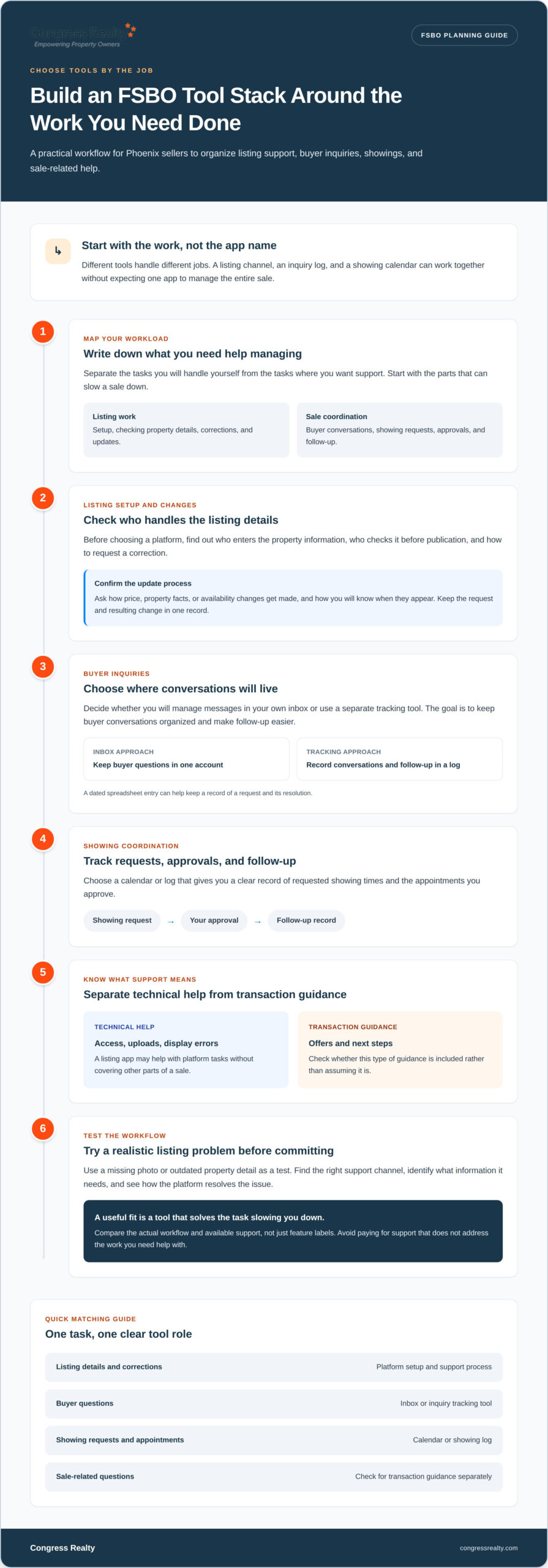
Choose a platform by identifying the selling tasks you want help managing. One seller may need listing setup and changes; another may need a way to organize inquiries and showing requests. Write down what you’ll handle yourself, then compare the support available for the rest. Zillow can help you review how property details appear to buyers, but it doesn’t replace a clear plan for managing the sale.
Before choosing a listing platform, look for clear answers about its support process. How do you request a correction if the property description contains an error? Who makes a listing change, and how will you know when it appears? These questions matter when updating a price or correcting a feature. Keep the response and resulting change in one record, such as a dated spreadsheet entry.
- Listing setup: Identify who enters the property details and who checks them before publication.
- Listing changes: Find the process for correcting facts, changing the asking price, or updating availability.
- Buyer inquiries: Decide whether you’ll manage messages in your own inbox or use a separate tracking tool.
- Showings: Choose a calendar or log that records requests, approvals, and follow-up.
For example, a seller who can answer inquiries but needs listing assistance should prioritize clear setup and correction procedures. A seller who can create a listing but struggles to organize conversations may benefit more from a dedicated inquiry log. Don’t pay for support that doesn’t address the task slowing you down. Compare the actual workflow, not just feature labels.
Separate technical help from transaction guidance. Technical help covers access, uploads, and correcting display errors. Transaction guidance concerns offers and the next steps in a sale. A listing app may support the first without covering the second. Note which type of assistance each platform provides, and don’t assume one includes the other.
Try a practical test before committing: describe a likely problem, such as a missing photo or outdated property detail, then find the platform’s process for resolving it. If you can’t identify the right channel or required information, you may find the support difficult to use when timing matters. This comparison helps you choose tools for your actual workload, not just a long feature list.
FSBO buyer inquiry and showing app comparison
FSBO apps differ in listing reach, ease of use, and support for buyer conversations. A marketplace app helps buyers find properties, while an MLS listing service can place a listing on an MLS and feed participating real estate sites. Email, a calendar, and a tracking sheet help you follow up. Choose tools by the task each performs, not by the length of its feature list.
Gmail or another email app can keep buyer questions in one account. Google Calendar can track requested showing times and appointments you approve. A Google Sheets log can record each buyer’s name, contact details, questions, your response, and the next step. These everyday tools provide a straightforward workflow without asking one app to manage the entire transaction.
What features help FSBO sellers manage inquiries, showings, offers, and paperwork? Look for inquiry records, appointment tracking, offer status notes, and organized document storage. For example, log when an offer arrives and its requested response deadline, then store the documents in a clearly labeled folder.
- Email: Keep buyer questions and replies together, and record key details in your tracking sheet.
- Google Calendar: Track showing requests, approved times, and follow-up reminders.
- Google Sheets: Compare inquiries and offers using consistent fields, such as price, contingencies, and timing.
- Document folders: Organize property records and offer paperwork so you can find the correct version.
Before a private showing, request the information you need to schedule it. Apply the same objective screening steps to each inquiry and give buyers consistent, factual answers. Keep control of final showing approval, and don’t share sensitive information in a public listing or casual message. Review call and message records so you can promptly correct inaccurate answers.
How do FSBO apps handle buyer-agent commissions and negotiation? Apps don’t decide the terms for you. FSBO sellers may offer a buyer-agent fee of 2.5-3%, but paying one isn’t required. Consider any proposed amount as part of the offer discussion, and document agreed terms in the transaction paperwork.
Choose a workflow that fits your capacity. A shared calendar helps coordinate appointments, while a separate sheet keeps inquiry and offer details easy to review. This combination keeps records organized and decisions in your hands.
An MLS listing service can place a listing on an MLS and feed it to participating real estate sites, while a marketplace app helps buyers find properties.
Ask for needed information before committing time to a private showing. Make the request part of your inquiry process before choosing or confirming an appointment. Keep it clear and consistent, then review the response before deciding how to proceed. This pause gives you time to consider the inquiry rather than respond automatically.
Once you have the needed information, decide whether to offer a showing time or ask for clarification. If details are missing, follow up before scheduling. Record the request, response, and next step alongside the inquiry so its status is easy to review. Use the same approach for each inquiry, while keeping approval of private showings in your hands. This simple sequence makes scheduling decisions deliberate and keeps buyer conversations organized.
Marketing tools and seller support
Strong marketing gives buyers clear reasons to consider a property. A phone camera can capture rooms, outdoor spaces, and useful details, while Google Photos helps organize images. Canva can create simple promotional graphics, and Google Docs can help draft a concise description. Keep every image and statement accurate, and match the presentation to the home’s real features.
Can FSBO sellers use apps to create listing photos, descriptions, and virtual tours? Yes. A smartphone can capture photos, writing tools can help shape a description, and virtual tour tools can present a navigable view of the home. Review every image and sentence yourself to avoid misleading edits or unsupported claims.
Build a photo sequence that helps buyers understand the home. Start with the exterior, then show shared living areas, bedrooms, the kitchen, bathrooms, and notable features. Avoid near-duplicates. For example, pair a kitchen overview with a close-up of distinctive cabinetry. Use consistent lighting and keep personal documents, family photos, and other private details out of frame.
- Google Photos: Sort property images into albums and keep selected listing photos separate from personal pictures.
- Canva: Prepare a simple property flyer or social post using accurate details and readable text.
- Google Docs: Draft and revise the description before entering it into a listing form.
- Virtual tour tools: Build an online walkthrough that lets buyers explore the layout between showings.
Write the description around concrete features, not broad praise. Name a room, improvement, or outdoor feature, then explain what buyers will see. “Updated kitchen with a central island” gives more useful information than “perfect dream home.” Verify every detail before publishing, including room descriptions and included fixtures.
Marketing also needs upkeep. If a showing reveals a frequently asked question, clarify the relevant listing detail if it was incomplete. Replace images of outdated features, and keep the description aligned with the property’s current condition. A virtual tour supports online discovery, but it doesn’t replace accurate photos, responsive communication, or an in-person showing. Keep the final description, selected images, and tour materials together so every platform uses consistent information.
Platform pricing and service tiers
Compare each platform by its full cost, not its headline tier. A basic app may organize inquiries, while a listing service may provide MLS exposure. Those solve different problems. List the features you need, then match each one to its charge or included service. Avoid paying twice for the same task.
For example, compare a marketplace account, an MLS listing service, and a transaction-support package as separate options. A marketplace can help buyers discover a property. MLS access distributes listing information through participating channels and provides the same exposure as listings for which sellers pay a full commission. A support package may cover different steps, depending on its terms. Review what each option actually does before comparing prices.
Percentage-based compensation also affects the sale budget. A listing-agent commission of 2.5-3% provides a comparison point, but it doesn’t tell you what an app or platform includes. Separate listing costs from any buyer-agent compensation, photography, transaction help, and other optional services. Record each amount in one budget so the total stays visible.
- Listing access: Identify whether the tier publishes the property to a marketplace, an MLS, or both.
- Marketing: Check whether photography, a virtual tour, or promotional materials come with the service.
- Support: See whether the tier covers listing edits, inquiry management, or transaction paperwork.
- Renewal and changes: Read the terms for extensions, cancellations, and listing updates.
Use a spreadsheet to compare platforms line by line. Add the service name, included tasks, additional charges, renewal terms, and the feature you expect to use. For instance, a seller who already has listing photos may value MLS distribution more than a marketing bundle. Another may prioritize help with listing changes or transaction steps.
Compare the total with your selling plan, not another seller’s package. If you’ll handle buyer messages and showings yourself, prioritize the exposure or support you lack. If you need help with a particular task, consider that task separately before choosing a tier. This makes the trade-offs clear and keeps your choice aligned with your budget and workload.
Congress Realty
Congress Realty helps sellers connect listing exposure with practical property marketing tools. If you want to manage buyer conversations yourself but need an MLS listing, its Multiple Listing Services can support that part of your plan. MLS listings receive the same exposure as listings paid with a full commission. Choose tools that address a real gap in your selling process, while keeping control of your decisions.
An MLS listing can put property details into a professional listing system that real estate professionals use. Buyers may discover that information through sites and services that receive listing data. The reach depends on listing distribution, so think of MLS access as one part of your marketing plan, not a promise that every buyer will see the home.
Then choose supporting tools based on how buyers will view and access the property. A Virtual Tour can help people explore the home online before arranging a visit. Yard Signs give passersby a way to notice the property. An eLockbox or Key Lockbox can support property access arrangements, while you retain control over showing approval and scheduling.
- Multiple Listing Services: Add professional listing exposure to your FSBO marketing approach.
- Virtual Tour: Give prospective buyers another way to view the home online.
- Yard Signs: Make the property visible to people nearby.
- eLockbox and Key Lockbox: Support access arrangements for visits you approve.
These offerings work alongside the apps you use for messages, calendars, and document records. For example, pair an MLS listing with a calendar for appointments and a separate log for buyer questions. MLS listings receive the same exposure as listings paid with a full commission. Listing and marketing tools help present the home; your records help you manage inquiries and organize important decisions.
Consider this approach if you want to sell independently but need listing exposure or practical marketing support. It may not suit a seller who wants someone else to manage every buyer conversation or make decisions on their behalf. Compare the available tools with your responsibilities, then choose what supports your preferred level of involvement.
To explore the selling process and available listing support, contact Congress Realty about selling your home.
Frequently Asked Questions
What features can FSBO sellers use in real estate apps?
No single app fits every seller, so choose tools around the work you want to handle. Zillow, Realtor.com, and Redfin can help you review buyer-facing property pages. For MLS placement, use a listing service. The MLS is exclusive to members, and only members can make changes; Congress Realty makes changes on the seller’s behalf.
Which FSBO apps offer mobile features and customer support?
For mobile use, test the tasks you’ll actually perform, such as reviewing an inquiry or checking an appointment while away from home. For support, compare the platform’s stated process for correcting listing information and resolving access problems. MLS members make listing changes, so identify how correction requests reach a member. A useful platform should make its support steps clear before a time-sensitive issue arises.