
Congress Realty provides Multiple Listing Services for home sellers in Phoenix, Arizona. To understand how to make changes to my MLS listing, identify the details you want updated, then send clear instructions through the listing process. Phoenix sellers can request multiple edits together when the change form supports them, with each field and its replacement information stated clearly.
Need to update a price or status, add pending information, or find out why a change hasn’t appeared? This guide explains how to request an edit and distinguish an MLS update from a delay on a real estate portal. Sellers in Phoenix and across Arizona can use these steps to keep listing information accurate while remaining in control of the decisions.
Key Takeaways
- Match the listing status to the transaction stage and include the pending details needed to keep the record clear.
- Use your best estimate of the actual sale date as the estimated close date, and update it if escrow is delayed.
- Make a price change request specific by identifying the listing and the new price you want reflected.
- Know the roles: sellers decide what information to change, while the listing agent or brokerage submits the MLS update.
- Congress Realty’s Multiple Listing Services can help sellers who want professional MLS support while staying involved in listing decisions.
Entering pending-status information
After accepting an offer, submit a status-change request through the listing agent or brokerage and provide the pending details requested by the MLS. If you’re taking the home off the market without an accepted offer, request the status that fits the situation and give the effective date.
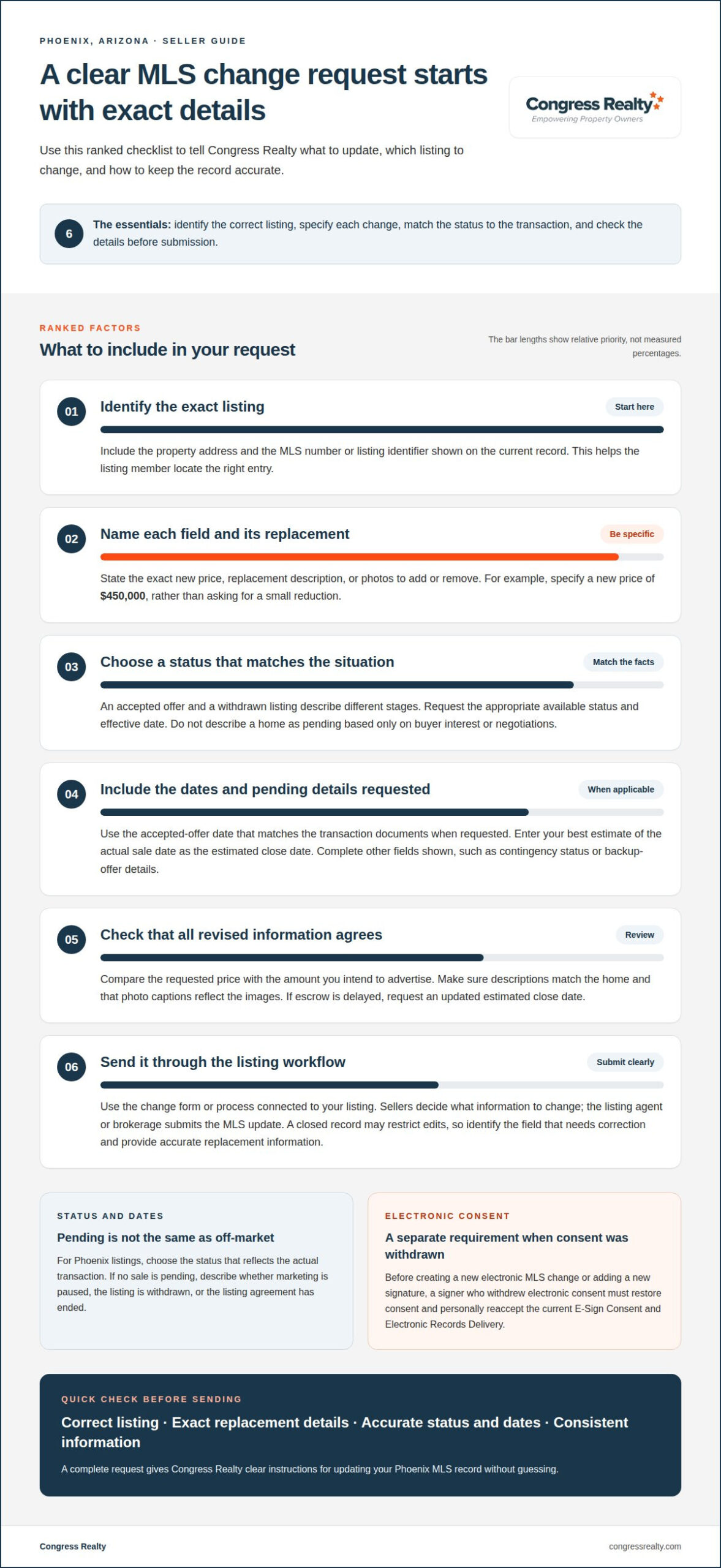
- Choose the status that matches the transaction. An accepted offer and a home withdrawn from active marketing describe different situations. Select the matching option in the MLS change form, such as a pending status for an accepted offer, if that option appears in your local MLS. Status labels and form fields vary by MLS, so use its available choices.
- Identify the listing precisely. Include the property address and listing identifier shown on the current record. These details help the listing agent locate the correct entry, especially when a brokerage handles multiple listings. State the requested status change clearly, rather than sending a general note that the home has an offer.
- Provide the accepted-offer date when requested. Enter the date that matches the transaction documents and the MLS form’s instructions. Keep the date consistent across the change request and supporting information. If the offer has not been accepted, don’t describe the listing as pending based only on buyer interest or ongoing negotiations.
- Enter the estimated close date carefully. Use your best estimate of the actual sale date, not an arbitrary date or the date you submitted the status request. For example, if the transaction is expected to close later than the accepted-offer date, enter the expected closing date in the designated field.
- Include other pending fields shown on the form. The MLS may request details such as the contingency status or whether the seller will continue considering backup offers. Answer each displayed field accurately. Don’t assume every MLS uses the same fields or that a pending status automatically communicates every offer-related detail.
- Update the close date when escrow changes. If escrow is delayed, submit a change to the estimated close date. Use the revised best estimate of the actual sale date. Keeping that field current helps prevent the listing record from carrying an outdated timeline while the transaction remains pending.
- Use the appropriate off-market status if no sale is pending. A seller who pauses marketing, withdraws a listing, or ends a listing agreement should describe the actual situation. Ask the listing agent to submit the matching status and effective date. Don’t use pending merely to hide a home from active search results.
- Complete electronic consent requirements before signing. If a signer withdrew electronic consent, that signer must restore consent and personally reaccept the current E-Sign Consent and Electronic Records Delivery before creating a new electronic MLS change or adding a new signature.
Before sending the request, check the property address, selected status, dates, and pending details. Clear instructions give Congress Realty the information needed to update the MLS record without guessing which status or transaction details you intend.
MLS listing price and status updates
While your listing is active, ask Congress Realty to update its price, photos, description, or status. After closing, request any correction through the brokerage because the MLS may restrict edits to a closed record.
-
Identify Details That Can Be Changed
Review your current listing and name every field you want to update. Common examples include the asking price, photos, description, and status. Separate factual corrections from marketing edits, then provide the exact replacement information. Avoid a vague request like “update the listing,” which leaves the MLS member to guess what you mean.
For photos, identify the images to remove or add. For description edits, provide the replacement wording and point out any inaccurate details. Specific instructions help Congress Realty make the requested MLS changes accurately.
-
Change the Listing Price or Status
Provide the new asking price and identify the property by its address or MLS number. Don’t write “reduce it a little.” State the exact price you’ve chosen and include an effective date if the request form asks for one.
For a status update, request the MLS option that reflects the listing’s current situation. Active marketing, an accepted offer, and a withdrawn listing describe different stages. Choose the accurate status and provide the related details the form requests. Don’t select a status just to change visibility or hide an offer.
- Tie every request to the correct listing. Include the property address and MLS number. If you want several fields updated, list them separately, such as specifying the new price as $450,000 and the updated description with your preferred text. This helps Congress Realty submit each requested edit without mixing up details.
- Check that the new information agrees. Compare the price in your request with the amount you intend to advertise. Make sure the revised description matches the home’s features and each photo shows the property accurately. For example, if you change how you describe a room, update its photo caption too.
- Handle sold or closed records as corrections. Send the listing member the field that needs correction and the accurate replacement information. After closing, the MLS may restrict edits to the record. Don’t assume you can reopen the active listing or change every historical field.
- Submit a complete request through the listing workflow. Use the change form or process connected to your listing. Include the requested price, status, photo, or description details together when appropriate. Sellers who want help with how to make changes to my mls listing can explore MLS listing support for home sellers.
Submitting an MLS listing change
Send your request through the listing member or the process connected to your listing. The right route depends on who controls the MLS record and which local procedures apply.
-
Determine Who Can Make the Change
Identify the listing member responsible for the MLS record before sending instructions. Sellers choose the update they want, but only MLS members can edit listing information. For example, ask the listing agent to replace an outdated property detail with accurate wording. Don’t assume that owning the home gives you access to the MLS database.
If you want to understand how to make changes to your MLS listing, separate your decision from the data entry. You direct the change, and the MLS member submits it through the appropriate system.
-
Check the Applicable Change Rules
Review your listing agreement and the instructions for the local MLS that holds the record. Each MLS sets its own procedures for fields, corrections, and supporting details. State practices may also differ, so don’t assume a process from another market applies to your listing.
For a factual correction, identify the current entry and provide accurate replacement wording. For example, name the incorrect property feature and state the correct detail Congress Realty should enter.
-
Ask the Agent to Submit the Change
Send Congress Realty a written request with the property address, field name, and exact replacement information. For example: “Please update the property description for [address] to: [approved wording].” For a price or status change, state the precise information to enter. Clear instructions help prevent misunderstandings. The MLS provides the same exposure as listings paid with a full commission.
Ask Congress Realty to acknowledge your request and confirm when it has been submitted. Save the message with your listing records. Written instructions make it easier to track exact wording, a selected price, or a status change.
-
Consider Whether Sellers Can Edit Listings
Use the seller-facing tools provided with your listing to submit the information they support. These tools don’t give you direct access to the MLS record. An account on a public real estate portal also doesn’t let you edit the original MLS entry. Changes to an MLS listing generally need to be handled through the appropriate listing channel, and exposure can vary by listing arrangement.
Use seller tools for the fields they support, then send other requests to the listing member. You choose the information; an MLS member handles the database edit. This division keeps your instructions clear while the listing member manages the MLS entry.
Troubleshooting missed listing updates
A submitted change can reach the MLS before it appears on every real estate portal. Follow these steps to identify where the update stands and what information to share next.
- Check the MLS record first. Search by property address or MLS number, then compare the relevant field with your request. If the MLS shows the new information but a real estate portal still shows the old version, the MLS record has changed. That points to a delay between the MLS and the portal, not necessarily a missed MLS edit. The MLS provides the same exposure as listings paid with a full commission.
- Allow for the local publication schedule. Some MLSs publish updates every 15 minutes, while others publish once or twice a day. Some markets update listing information nightly. For example, a change submitted just after a nightly update may not appear in that market’s public feed until its next update. Consider the local schedule before treating a delay as an error.
- Separate MLS timing from portal timing. National real estate portals may refresh their listing data only a few times daily, even when an MLS and vendor update every 15 minutes. A revised status might therefore appear in the MLS before a portal reflects it. Compare the source record with the portal instead of expecting every site to display new information simultaneously.
- Pinpoint the field that remains outdated. Compare your requested update with each version of the listing you can view. Note whether the issue concerns price, status, description, or another field. If the photo changed but the description did not, record that difference. To resolve an incomplete update, identify the specific field and display rather than reporting generally that the listing is wrong.
- Ask the listing member to trace the request. Share the property address, the field in question, and where old information remains visible. Ask whether the MLS record reflects your request and whether the portal has refreshed. If the MLS still shows the previous detail, ask the listing member to review the submission for a missing field or an entry issue.
- Send a precise example if the problem continues. Provide a screenshot or describe the page, the old information displayed, and the correct information requested. For instance, explain that the MLS shows the revised status while a named portal shows the earlier status. This evidence helps distinguish a portal delay from an MLS update that needs attention. Knowing how to make changes to my MLS listing includes tracking the exact mismatch, not sending a general report that “the listing is wrong.”
Who can make changes to an MLS listing: the seller or the listing agent?
- Identify who controls the listing record. Find the listing agreement and note the named listing brokerage. The seller chooses the requested updates, while the listing agent submits changes through the MLS workflow. For example, tell the agent to revise the asking price, then provide the exact figure. Don’t assume property ownership automatically gives you MLS editing access.
- Separate approval from submission. Decide which information should change before sending instructions. The seller can approve a new price, corrected description, or status request. The listing agent handles entry through the brokerage’s MLS access. This distinction keeps your decision in your hands while giving the authorized listing professional a clear task to complete.
- Use a written request for each update. Include the property address, field name, and replacement information. For example, write, “Please change the description to: [approved wording].” For a price update, state the new amount instead of saying “lower the price.” Precise instructions help prevent misunderstandings between your request and the MLS entry. Direct editing access may depend on the MLS and brokerage workflow.
- Ask which seller tools apply to your listing. Some brokerages provide seller-facing tools for entering or revising selected listing information. Those tools don’t necessarily provide direct access to the MLS record. If a portal lets you edit a description but not a status, use it only for the available field and send other requests to the listing agent.
- Keep a record of the change request. Save the message, the information you supplied, and any response from the agent. If you requested a photo replacement, keep the image filename and the instruction identifying which photo to remove. If you requested a status update, record the requested status and the date you sent the instruction.
- Follow up with a specific comparison. If a public listing still shows old information, tell Congress Realty which field remains unchanged and where you saw it. For example, say that the MLS entry shows the revised price but a portal still displays the previous one. This gives the brokerage a clear starting point for distinguishing an MLS edit from a display delay.
- Choose listing support that fits your role. If you want to make informed listing decisions while an MLS professional handles submission, explore MLS listing support for sellers. Bring your requested changes, property details, and decisions to the process so each update has clear direction.
Congress Realty: Multiple Listing Services
Congress Realty provides flat-fee MLS listings for sellers in Phoenix and throughout Arizona, as well as Alaska, California, Idaho, Louisiana, Montana, Nevada, New Mexico, Oregon, Texas, Utah, and Washington. You decide which information to change, such as the asking price, status, or property description, and provide the details to the brokerage. Only MLS members can edit a listing, and Congress Realty submits requested changes on your behalf. Your listing receives the same exposure as listings paid with a full commission. If you’re ready to discuss MLS listing support for your sale, contact Congress Realty.
Keep Your Listing Decisions Moving
Keep your listing decisions clear and your next steps organized. As you consider how to make changes to your MLS listing, treat each update as part of your selling plan. Choose information that reflects your current goals, communicate your decision clearly, and keep the right support in place as the sale progresses.
Professional listing support lets you stay involved without managing every MLS task alone. Congress Realty offers flat-fee MLS listings, with eLockbox and yard signs available to support a home sale. Choose the level of support that suits your needs and move forward with a clear plan for your property.
Explore listing support for your home sale and take the next step with confidence. You remain in command of your decisions, with a practical path forward.
Frequently Asked Questions
Can I put multiple changes on a single change request?
Yes, you can group several requested edits in one change request if its form allows them. List each field separately, such as price, status, and description, and give the exact replacement information for each. The listing member can submit those changes to the MLS, which provides the same exposure as listings paid with a full commission. Separate details make it easier to spot an omitted edit when the updated record appears.
How many free changes do I get to my MLS listing?
There isn’t one free-change allowance for every listing; the applicable limit depends on the listing package and its terms. Some listing options include limited changes, while others allow more. Before requesting several edits, review the change terms connected to your listing and prioritize corrections that affect accuracy, such as an incorrect feature or outdated status. MLS listings receive the same exposure as listings paid with a full commission.
How long does it take for MLS listing changes to appear on real estate websites?
Timing depends on the MLS and the website receiving its listing data. Some MLSs publish updates every 15 minutes, while others publish once or twice a day; some markets update nightly. National portals may refresh only a few times daily, even when the MLS and vendor update every 15 minutes. The MLS provides the same exposure as listings paid with a full commission, but portal display timing can differ.
How do I change the list price of my home in the MLS?
Send the listing member a written request with your property address and the exact new asking price. Sellers typically request MLS record changes through the person or service handling the listing rather than editing the record directly. The agent or brokerage submits the update through its MLS access. The MLS provides the same exposure as listings paid with a full commission, and a clear written price request helps prevent entry errors.
Are there fees or contract requirements to change an MLS listing?
Fees and change limits depend on your listing agreement and selected service terms. Review those terms for the number or type of included edits and the process for requesting changes. Don’t assume every update carries a separate fee or that every package handles edits alike. The MLS is exclusive to members and provides the same exposure as listings paid with a full commission; your listing agreement sets the applicable change conditions.